
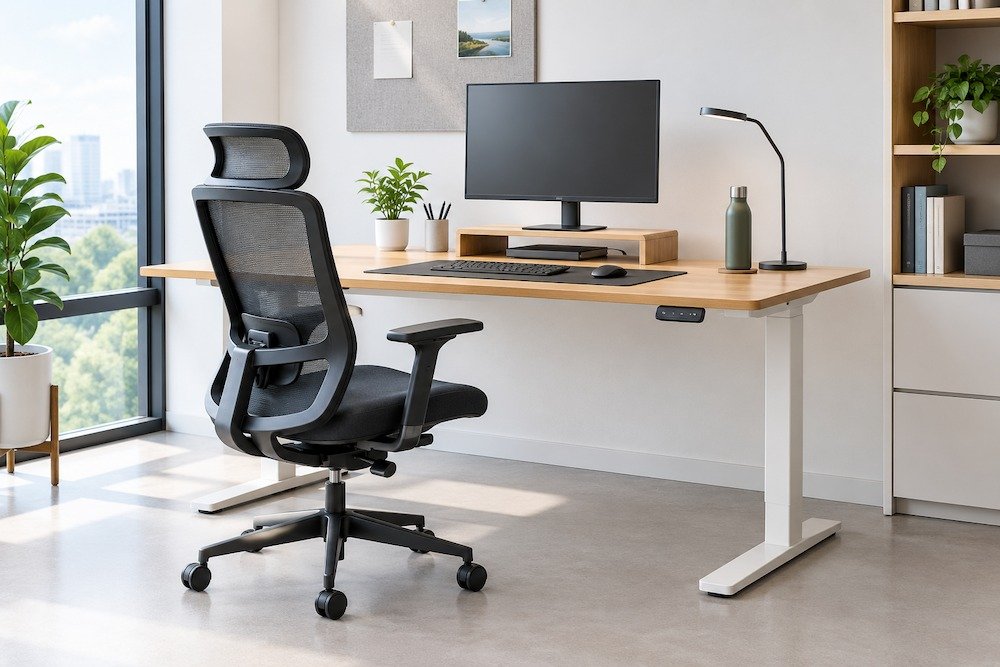
Employees who spend long hours at a desk often deal with discomfort that builds up slowly. A stiff neck, sore lower back, or tired eyes may not seem serious at first, but over weeks and months, they affect focus and energy levels. Much of this comes down to how the workstation is set up. A poorly designed desk and chair force the body into awkward positions, leading to fatigue, poor posture, and reduced concentration. An ergonomic office workstation solves this by arranging furniture and accessories around how people actually sit, move, and work. Getting the desk height, chair, monitor position, and accessories right makes a real difference in comfort. When these elements come together, employees can work through long hours with less strain and better focus, and the workplace itself becomes more productive.
Why Is an Ergonomic Office Workstation Important?
An ergonomic workstation supports the body during long stretches of desk work, helping employees maintain better posture without constantly having to think about it. This reduces the physical discomfort and fatigue that often build up by the end of a workday. When the body is comfortable, the mind stays sharper too, which shows up in better concentration and steadier output. Since no two employees are built the same way or work in the same style, ergonomic workstations that can be adjusted allow each person to set things up according to their own needs. The result is a workplace that feels more comfortable and considerate of the people using it, day after day.
Key Elements of an Ergonomic Office Workstation
Nine functional practical elements determine how well a workstation supports everyday tasks: desk height, chair support, monitor position, keyboard placement, legroom, foot support, cable management, lighting, and the option to sit or stand. Getting each one right, even by a few centimetres, changes how your body feels by the end of a long shift.
Correct Desk Height: Desk height may seem like a small detail, but it affects several aspects of your posture, including shoulder position and wrist alignment while typing. Too high, and your shoulders creep up toward your ears without you noticing. Too low, and you end up hunching forward to reach the keyboard. A good rule of thumb is keeping your elbows at close to 90 degrees when typing, with forearms roughly level with the floor. This is exactly why adjustable-height desks work so well. They let each person find their own number instead of settling for whatever height the desk happened to ship with.
Learn more about: Height-Adjustable Desks vs Fixed Desks: Which Is Better for Your Office?
Ergonomic Office Chair: If there’s one piece of furniture that decides how the whole day feels, it’s the chair. Lumbar support helps maintain the lower spine’s natural curve instead of allowing it to flatten after a few hours of sitting. Seat height matters just as much, since feet should rest flat on the floor rather than dangling or pressing down at an angle. Seat depth should leave a small gap, about two fingers’ width, behind the knees. Armrests that adjust up and down keep shoulders relaxed instead of shrugged, and solid back support stops the slow slouch that tends to creep in by mid-afternoon.
Monitor Position: The top edge of the screen should line up roughly with eye level, so the neck stays in a neutral position instead of tilting up or craning down. Distance matters too. An arm’s length away is a decent starting point for most people. When the monitor sits too low or too close, it’s easy to lean in without even realising it, and that’s usually where neck and eye strain start building up. Anyone running two monitors should keep them level and centred so the head isn’t constantly turning toward one side.
Keyboard and Mouse Placement: Wrists do better when they’re straight, not bent upward or twisted to one side while typing or moving the mouse. Keeping both close to the body rather than stretched out at arm’s length takes pressure off the shoulders as well as the wrists. A keyboard tray, or simply a desk with enough depth, makes it easier to hold this position without thinking about it all day.
Adequate Legroom: There needs to be enough open space under the desk to shift position, stretch out, or simply move without knocking into drawers or cable boxes. When legroom is tight, people tend to twist into odd sitting positions just to fit, which cancels out whatever else was done right with the rest of the setup.
Foot Support: Even after adjusting the chair and desk properly, some people, particularly those who are shorter, still find their feet don’t quite reach the floor. A footrest closes that gap and takes some of the pressure off the lower back.
Cable Management: Cables trailing across the floor or piled on the desk aren’t just untidy. They’re a tripping risk, and they make cleaning around the workstation harder than it needs to be. Cable trays, clips, or channels built into the desk keep everything tucked out of the way, which makes the whole space feel calmer and safer to work in.
Lighting and Glare Control: Dim or harsh lighting makes the eyes work harder than they should, and that shows up as strain by the end of the day. Desks should be placed so windows and overhead lights don’t bounce off the screen. A combination of natural light and an adjustable desk lamp usually covers most needs, and an anti-glare filter helps where windows can’t be avoided.
Sit-Stand Options: Sitting all day isn’t great, but neither is standing all day. Height-adjustable desks let people move between the two through the day, which takes some load off the back and tends to keep energy from dipping as sharply during long stretches of work.
How to Set Up an Ergonomic Workstation for Long Working Hours
There’s a logical order to setting up your workstation. Begin with the chair, since it affects everything else, then move to the monitor, followed by the keyboard and mouse, and finish by checking the space around you.
- Set your chair first. Get the height and lumbar support right first, since everything else is set relative to it.
- Bring the monitor to eye level, about an arm’s length away, so you’re not craning your neck.
- Keep the keyboard and mouse close enough that your elbows stay relaxed by your sides.
- Check that your feet rest flat on the floor. If they don’t, a footrest closes that gap.
- Leave enough space under the desk to move your legs without hitting anything.
- Go for adjustable furniture where your budget allows. It adapts as your needs change.
- Take regular movement or screen breaks instead of staying in one position through the entire shift.
How Can Customised Workstations Improve Your Ergonomics?
Customised workstations let you build ergonomic support directly into the furniture rather than adding it after the fact, which is important because no two offices share the same layout or team.
- Workstation dimensions and configurations can be planned around your floor area, team size, and how each department uses the space.
- The needs and working methods of various employees are considered during the design phase.
- Ergonomic features become part of the workstation, rather than being attached to it.
- Space gets used efficiently without compromising comfort.
- Cable management, storage, and partitions can be built in alongside the ergonomic elements.
- Departments and team sizes of any scale can be accommodated within one coherent design.
Read more: Smart Desks for IT Offices: Boosting Productivity Through Ergonomic Design
Creating Ergonomic Workspaces with Benchy
An ergonomic workstation comes together through small, deliberate choices: the right desk height, a supportive chair, a well-positioned monitor, and accessories that help reduce strain. These elements work together to make long working hours more comfortable and support better focus throughout the day.
If you’re looking to bring this approach to your office, Benchy, a customised office furniture manufacturer based in Kerala and Bangalore, designs ergonomic workstations focused on comfort, functionality, and efficient use of space. With durable materials and practical craftsmanship, Benchy offers complete office furniture solutions, including workstations, office chairs, storage solutions, meeting room furniture, cafeteria furniture, and collaborative furniture tailored to different office layouts and team requirements.


